✍️
Text prompt
Describe the genre, mood, instruments, vocal character, arrangement and how the song changes over time.
Pika Music turns your creative direction into complete, mixed songs with vocals - in seconds. Start from a text idea, your own lyrics, a short voice sample or a reference track, then use the song in your videos. Here's how it works, how to use it, and prompts to try.
Pika Music is Pika's own music generation model. It accepts text, lyrics, a voice reference, a music reference - or any combination - and produces a complete stereo track, all in one model and one workflow. You don't need a separate tool for each starting point.
It's built for iteration: keep your lyrics fixed while you try different styles, change the voice, or make a "cover" of a source track in a new voice and style. You can also set the duration and a seed to reproduce results.
Pika Music is part of Pika Audio, alongside Pika Soundtrack, Pika Speech and Pika SFX.
| Pika Music at a glance | |
|---|---|
| Inputs | Text prompt, lyrics, voice reference, music reference |
| Output | Complete stereo song, with or without vocals |
| Controls | Duration and seed |
| Speed | About 6.2 s for a 90-second song (Pika's tests) |
| Where | Music Studio on pika.art, Pika API |
From Pika's official Pika Music announcement.
Describe the genre, mood, instruments, vocal character, arrangement and how the song changes over time.
Paste your lyrics with section tags like [verse] and [chorus] to guide the structure. Keep them fixed while changing the style.
A short vocal sample sets the singer's timbre, delivery and energy - on its own or with a prompt and lyrics.
Borrow a track's overall feel; your prompt and lyrics decide the content.
Turn your sound on. Only use voices and tracks you have the rights to - Pika asks you to confirm this when you upload.
Sign in at pika.art (or the iPhone app) and open Music Studio.
Write the genre, mood, tempo, instruments and vocal style.
Paste lyrics with [verse], [chorus] and [bridge] tags - or leave them out for an instrumental.
Upload a short voice sample or a reference track you have rights to.
Choose the duration, generate, and listen.
Keep the lyrics, try new styles, then add the song to a video or download it.

If you already have the video, try Pika Soundtrack - it scores a clip with music, ambience and Foley matched to the action.
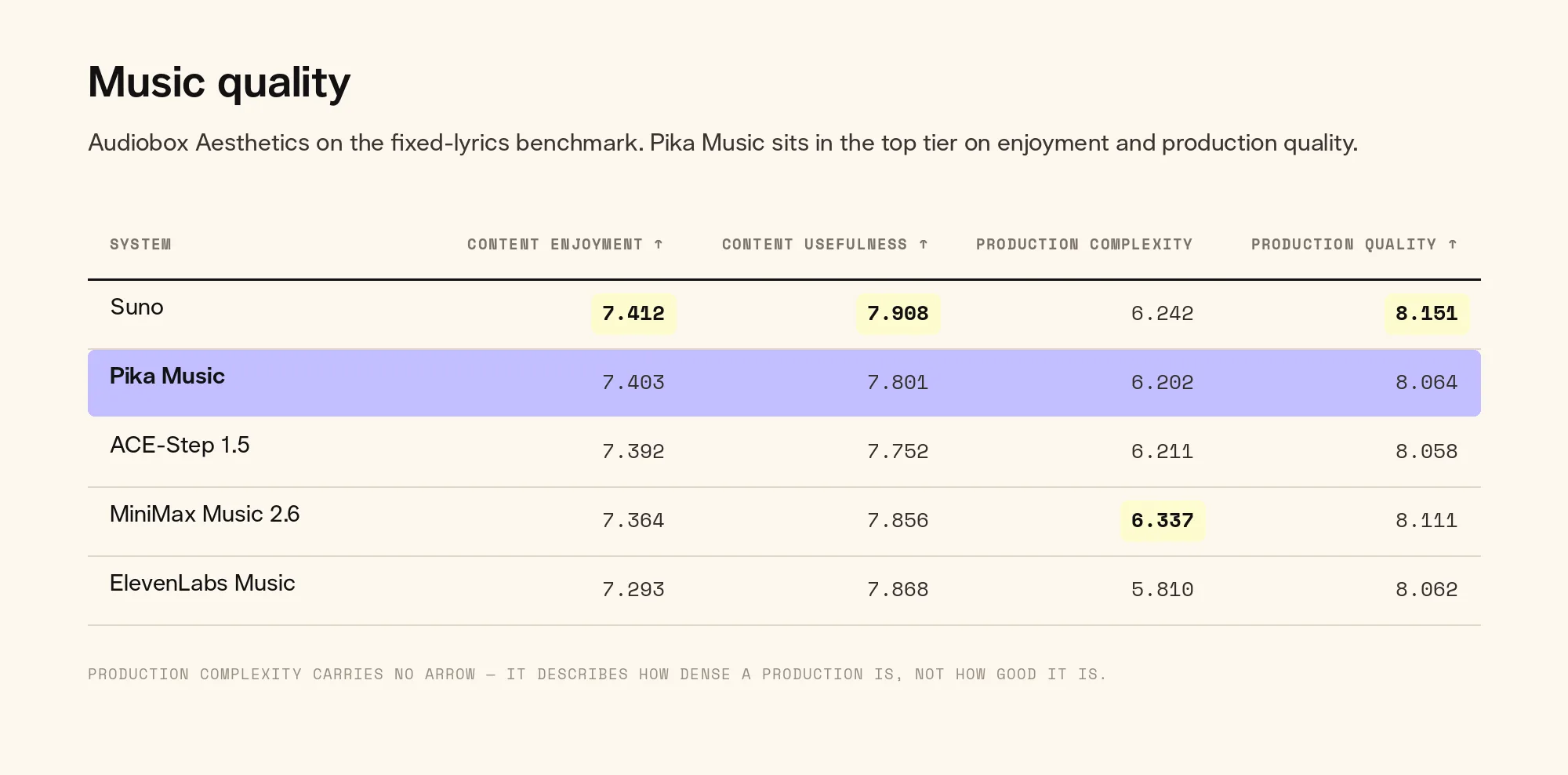
Pika published speed and quality results for its text-and-lyrics-to-music path.
| Audiobox Aesthetics | Pika Music | Suno |
|---|---|---|
| Content enjoyment | 7.403 | 7.412 |
| Production quality | 8.064 | 8.151 |
Mix genre + mood + instruments + vocals + tempo + structure.
Turn a one-line idea into a full track.
Hear your lyrics sung in any style.
Re-imagine a track you own in a new voice and style.
Original music for Reels, YouTube and ads. See trailers.
A recognisable sound for your brand. See branded content.
Theme tunes, loops and intros.
Pika Music is available through the Pika API Club at dev.pika.art, under Pika's audio models. Use the free catalog and quote endpoints to see inputs and price before you generate.
Confirm the exact endpoint and inputs in Pika's API catalog. Other music models, such as MiniMax Music, are also available in Pika.
Only upload voices you own or have permission to use - Pika asks you to confirm this.
Only upload tracks you have the rights to use as a reference.
Don't present AI songs as real performances by real artists.